
Here's how you can watch the Olympics live on Linux:
Step 1: Get VLC
Ubuntu:sudo apt-get install vlc
Other distros; go to http://www.videolan.org/vlc/
Step 2: Get sopcast, extract it and go to its folderwget http://download.sopcast.cn/download/sp-auth.tgz
Step 3: Launch p2p sopcast stream
tar xvzf sp-auth.tgz
cd sp-auth
Usage:
./sp-sc-auth sop://[sopcasturl] [shareport] [streamport] > /dev/null &
List of streams: http://www.sopcast.org/channel/
Full list in XML: http://www.sopcast.com/chlist.xml
More streams on Google
Note: Not all streams have audio
Note 2: If sp-auth is giving out an error, you might need to download the stdc++5 library link: http://www.sopcast.com/download/libstdcpp5.tgz
Example:./sp-sc-auth sop://broker1.sopcast.com:3912/48608 3904 8904 > /dev/null &
Step 4: Fire-up VLC, open network stream http://localhost:[streamport]/tv.asf
Note: you might have to wait 20 seconds or so before it allows you to connect to the stream
Screenshots:

Source: Here
Monday, August 11, 2008
How to Watch Live Olympics on Linux
Wednesday, July 30, 2008
New iPod touch referenced in iPhone 2.1 firmware
A simple reference in the beta of Apple's latest firmware could hint at a significant remake of the iPod touch. Also, Microsoft has posted the controversial "blind taste test" videos that promote an improved Vista, and a Wyoming county's schools will receive 3,000 MacBooks.
Although the mention is short, a text string in the iPhone 2.1 beta firmware could have a significant impact on the iPod touch, according to a discovery made by iPhone Atlas.Click Here to Read More..
While Apple has used "iPod 1,1" to describe the current iPod touch as the first OS X-based iPod and the only minor revision, multiple files now contain references to "iPod 2,1" -- a number change which, for past Macs, has referenced a major revision instead of a minor tweak..
For contrast, the iPhone 3G is simply listed as "iPhone 1,2" despite its new features and indicates that the design underneath is largely identical.
The company has in recent years reserved either August or September to start updating its iPods and this year launched a back-to-school promotion that gave away free iPod touch players to students buying a Mac at the same time, triggering a shortage that has helped Apple keep its touchscreen iPod supply in check.
Saturday, May 31, 2008
Fix Virus Alert in System Clock
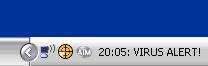
Open the registry and edit the ff:
1. [HKEY_CURRENT_USER\Control Panel\International\sTimeFormat

2. HKEY_LOCAL_MACHINE\SOFTWARE\Microsoft\Windows NT\CurrentVersion\ProductId

Close the registry and reboot the machine.
Click Here to Read More..Wine 1.0 RC3 Released
"What's new in this release (see below for details):
- Bug fixes only, we are in code freeze."
----------------------------------------------------------------
Bugs fixed in 1.0-rc3:
2368 Wine loses its X-Window when switching to another virt. desktop in Fvwm
4468 advapi32: Fulltilt Poker hangs (GetCurrentHwProfileA is a stub)
4652 Adobe Dreamweaver MX 2004 installs well but does not run.
6206 riched20:Live Person crashes
7214 wine_dbg_vprintf: debugstr buffer overflow (contents: 'err:msvcrt:demangle_datatype Unknown type ')
7318 supertux 0.3 freezes (dsound bug)
7904 C&C 3 setup displays empty window
7979 S.t.a.l.k.e.r. - some objects appear over-bright or too dark
8043 Dreamfall: speech gets skipped in dialogues
8129 Acomba: Freezes after closing an unsaved invoice
8408 unimplemented function ntoskrnl.exe.memset
9799 Textures on vehicles are too dark in GTA Vice City!
10025 Cyrillic glyphs are missing in built-in Tahoma Bold
11248 fixme:winsock:WSASocketW Unsupported socket family -1!
11389 ABBYY FineReader 7.0 Professional Edition crashes at start
11822 All applications over VNC: Applications freeze for any letters input
11914 DestroyContext in dlls/wined3d/device.c causes regression in Everquest2
11929 Audiosurf: Questviewer.exe crashes with page fault.
11989 Arindal.exe Text-Windows not displayed correctly
11991 OpenGL regression in Hitman 2 and Hitman 3
12192 SupCom Addon: No units visible
12322 Sacrifice game crashes in full screen mode
12455 Warcraft III 1.21b - Crashes with Fatal Error on Switch Desktop
12540 Favourites menu doesn't work as expected
13102 WinterMute Engine drawing window bug
13120 dzh2 crashes on startup
13148 Guitar Pro 5 Crashes (maybe audio problem)
13154 Jedi Academy: launcher freezes when button clicked
13277 Return to Mysterious Island crashes
13342 Winedbg doesn't handle longlong's well
13372 Adobe Acrobat Pro 8 / Acrobat Reader 8 -- install fails
13395 Guild wars not start
13403 fcc hangs , unless using native dbghelp
13420 Hang on first keypress
13475 Sytray icon totally transparent
13476 SQLyog community edition : Cannot connect to a remote DB through gSTM tunnel
----------------------------------------------------------------
for more information visit http://www.winehq.org/?announce=1.0-rc3
Monday, December 10, 2007
Windows Update Problem (KB898461 - Package Installer)
Windows Update KB898461 (Package Installer) is not installing. To fix the issue with installing KB898461 (Package Installer) simply rename the file: c:\windows\system32\spupdsvc.exe to c:\windows\system32\spupdsvc.old and then try the update again either through Windows Update or from the full installer which can be downloaded here:
It should now complete successfully and allow you to start getting other updates as well.
Monday, November 26, 2007
How to reset/remove TrendMicro OfficeScan uninstall password
Edit Ofcscan.ini file.
**On Windows.95/98 machines it is usually in C:\Windows\Ofcscan.ini
**On Windows.NT/2K machines it is usually in C:\WINNT\Ofcscan.ini (May also be in C:\Program Files\...)
1) Open the Ofcscan.ini file using notepad search for the [INI_CLIENT_SECTION]
2) Find the line reading Uninstall_Pwd= and type a # at the beginning of the line to comment it out.
3) Insert a new line saying Uninstall_Pwd=70
4) Save the Ofcscan.ini file and retry the uninstall. When it prompts you for a password, enter a '1'.


